
Introduction
In today’s digital age, creating an educational website that is both accessible and search engine optimized is no longer optional—it’s essential. Whether you run a school website, an eLearning platform, or an online course hub, ensuring compliance with WCAG 2.2 (Web Content Accessibility Guidelines) improves usability for all visitors, including those with disabilities. At the same time, optimizing for SEO (Search Engine Optimization) enhances visibility, drives organic traffic, and ensures your content reaches a broader audience.
Imagine a university launching an online course portal but struggling with poor search rankings and user engagement. By redesigning their website to meet WCAG 2.2 standards and implementing modern SEO techniques, they not only improve accessibility for disabled users but also boost their search rankings, resulting in a 35% increase in organic traffic.
This guide will walk you through the best practices to develop a WCAG 2.2-compliant, SEO-friendly educational website in 2025, ensuring a seamless experience for all users while improving search performance.
Why WCAG 2.2 Compliance Matters
The Importance of Accessibility
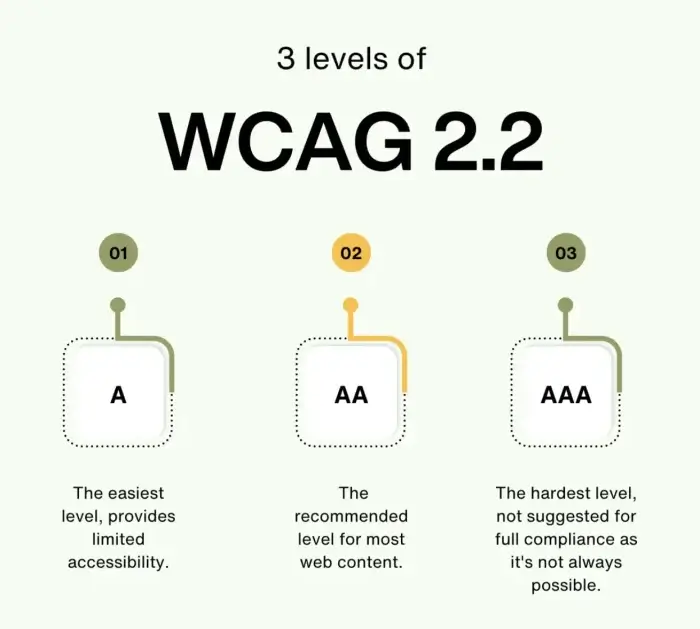
WCAG 2.2 is designed to make websites more inclusive by ensuring people with disabilities can navigate and interact with digital content effectively. Compliance with these guidelines isn’t just about avoiding legal risks—it’s about creating an environment where everyone can learn and engage.
Key Benefits of WCAG 2.2 Compliance
- Improved Accessibility – Ensures all users, including those with visual, auditory, cognitive, or motor impairments, can navigate your site.
- Better SEO Performance – Google prioritizes accessible, user-friendly websites in search rankings.
- Enhanced User Experience – A well-structured, intuitive design makes it easier for all visitors to engage with your content.
- Broader Audience Reach – By making your site inclusive, you attract more users, including those who rely on screen readers and keyboard navigation.
Steps to Build an SEO-Friendly, WCAG 2.2-Compliant Educational Website
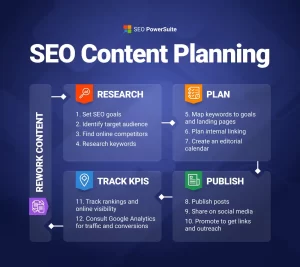
Step 1: Optimize Website Structure & Navigation
A clear, logical site structure improves both accessibility and SEO. Here’s how:
- Use clear headings (H1-H6) to organize content in a meaningful way.
- Implement breadcrumb navigation to help users track their location within the site.
- Ensure structured URLs that reflect the content hierarchy (e.g., www.yourschool.edu/courses/biology).
- Include an accessible search function so users can easily find relevant information.
For example, a high school that restructured its online curriculum portal saw a 20% increase in student engagement, as students could quickly navigate between courses and resources without frustration.
Step 2: Implement Mobile-Friendly eLearning Design
With most students and educators accessing learning materials via smartphones, a mobile-friendly design is non-negotiable:
- Use responsive design to ensure content adapts to any screen size.
- Optimize for fast loading speeds (under 3 seconds) to prevent user drop-offs.
- Ensure touch-friendly navigation, especially for buttons, menus, and interactive elements.
A university that optimized its mobile learning platform noticed a 50% increase in mobile engagement, as students could access resources effortlessly on their phones.
Step 3: Improve On-Page SEO for Educational Websites
SEO ensures that search engines can easily crawl, index, and rank your content. Here’s what to focus on:
- Use relevant keywords naturally, such as “SEO-friendly educational website” and “school website optimization.”
- Optimize meta descriptions, alt text, and title tags for better search visibility.
- Publish high-quality, informative content tailored to learners and educators.
- Structure content with internal linking, guiding users to related articles or resources.
A community college that revamped its website with these strategies saw a 40% increase in organic search traffic within six months.
Step 4: Enhance Website Accessibility (WCAG 2.2 Best Practices)
Making your website accessible involves several technical and design considerations:
- Keyboard Navigation – Ensure all elements (menus, forms, buttons) are accessible via keyboard commands.
- Alt Text for Images – Provide descriptive alt text for images to assist visually impaired users.
- Color Contrast – Maintain high contrast between text and background for readability.
- Transcripts & Captions – Provide text-based alternatives for all video and audio content.
- Forms & Interactive Elements – Use labels and error messages to help users complete forms correctly.
A non-profit educational organization saw a significant decrease in bounce rates after improving accessibility, as users with disabilities found it easier to navigate and consume content.
Step 5: Leverage Advanced SEO Strategies for 2025
As SEO evolves, staying ahead requires implementing future-proof strategies:
- Schema Markup – Use structured data to help search engines better understand your content.
- Voice Search Optimization – Optimize for natural, conversational queries as voice search usage rises.
- Backlink Strategy – Build links from reputable educational institutions and academic sources.
For instance, an online learning platform optimized its website for voice search and experienced a 25% increase in traffic from mobile voice queries.
Case Study: WCAG & SEO Impact on a School Website
A public school district faced accessibility complaints and low search rankings. By implementing WCAG 2.2 standards and refining their SEO strategy, they achieved remarkable results:
- 35% increase in organic traffic within six months.
- 50% improvement in mobile engagement due to a responsive redesign.
- Higher search rankings for key educational search terms, making it easier for parents and students to find resources.
This transformation not only made their website more inclusive but also positioned them as a leading digital education provider.
Conclusion
Building a WCAG 2.2-compliant, SEO-friendly educational website is essential for accessibility, search visibility, and user engagement. By optimizing website structure, implementing mobile-friendly design, enhancing on-page SEO, and ensuring compliance with accessibility standards, you can create an inclusive and high-performing educational platform.
With the digital landscape evolving, staying ahead in SEO and accessibility best practices will future-proof your website, ensuring it meets the needs of all learners in 2025 and beyond.
Call to Action
Do you need expert guidance to develop a mobile-friendly, WCAG 2.2-compliant educational website? Our team specializes in web development and SEO solutions tailored for schools and eLearning platforms. Contact us today to enhance your website’s accessibility and search performance!